
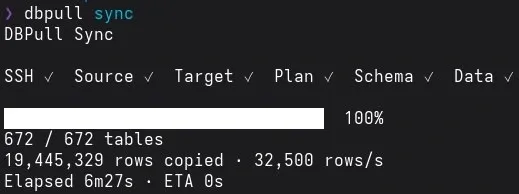
Working with a remote development or staging database was something I did regularly. Whenever I needed fresh data locally, I had to export the remote database and import it again into my local environment.
The process worked, but it was repetitive and more troublesome than it needed to be.
With larger databases, exporting the data could take a while and sometimes fail entirely. Then I would have to retry the export, move the dump, import it locally, and repeat the same process again the next time I needed fresh data.
After doing this enough times, I started thinking that the workflow should be simpler.
I didn’t need a complicated database platform. I just wanted a faster and more convenient way to synchronize a remote database into my local environment.
That became the reason I built dbpull.
The idea is simple:
dbpull syncInstead of manually exporting and importing the database every time, I wanted the synchronization process to become a single command.
The Problem
The main problem wasn’t that database export and import were difficult.
It was the friction around doing them repeatedly.
A typical workflow looked something like this:
connect to remote server
export database
wait for the dump
download it
import it locally
handle errors if something fails
For small databases, this is manageable.
As the database grows, however, the process becomes slower and failures during export become more annoying. More importantly, most of these steps are predictable. I was manually repeating a workflow that could be automated.
So the goal for dbpull became clear:
Make synchronizing a remote database to local faster, simpler, and repeatable.
How dbpull Works
dbpull treats the remote database as the source of truth and rebuilds the selected local database state from it.
At a high level:
Remote Database
      |
      | SSH tunnel
      v
    dbpull
      |
      | inspect schema
      | recreate local tables
      | copy data
      v
Local Database
The basic workflow is:
dbpull init
dbpull doctor
dbpull plan
dbpull sync
init creates the configuration, doctor verifies the connections, plan previews what will be synchronized, and sync performs the synchronization.
Some tables also don’t need to be copied.
For example, local development usually doesn’t need remote cache, session, or log data. dbpull therefore supports excluding entire tables or keeping their schema while skipping their data.
sync:
  exclude_tables:
    - cache
    - tmp_*
    - *_logs

  exclude_data:
    - sessions_*
    - audits
This keeps the synchronization focused on data that is actually useful locally.
Configuration
After the initial setup, dbpull stores the connection details and sync preferences in a configuration file. This means I don’t have to remember or re-enter the same database and SSH settings every time I want to refresh my local database.
The configuration can also be updated later with:
dbpull configThe idea is to configure dbpull once, then keep the day-to-day workflow as simple as possible.
If I only need a few tables, I can specify them directly:
dbpull sync table_a table_bThis is useful when I only need fresh data from a specific part of the database without waiting for a full sync.
A Few Engineering Challenges
The first idea behind dbpull sounded straightforward: read rows from the remote database and insert them locally.
Large databases made that more interesting.
Handling large amounts of data
Loading an entire database into memory before inserting it locally would not scale well.
dbpull instead processes data in batches. It can also synchronize table data using multiple workers.
sync:
  batch_size: 10000
  workers: 2
  max_batch_bytes: 16777216
The important part was finding a balance between speed and resource usage.
More workers can make synchronization faster, but they also mean more database connections and higher memory usage. Larger batches reduce the number of inserts, but they also consume more memory.
The goal wasn’t maximum possible throughput. It was making synchronization reasonably fast without making the tool unnecessarily aggressive.
Schema and foreign keys
Schema synchronization also needs more care than simply copying rows.
Tables can reference each other through foreign keys, so rebuilding several tables concurrently can introduce unnecessary complexity.
Because of that, dbpull keeps schema synchronization sequential while allowing data synchronization to run concurrently.
It is a small example of a principle I tried to follow throughout the project:
Parallelism is useful when it makes things faster without making them harder to reason about.
SSH should stay invisible
Remote databases are often only accessible through SSH.
dbpull handles the SSH tunnel as part of the synchronization process so the user doesn’t need to manually open and close one every time.
The implementation has several steps, but the user-facing workflow should still be:
dbpull syncThat simplicity is the point.
What dbpull Is Not
Keeping the scope small is an important part of the project.
dbpull is not a database replication system, migration framework, backup solution, or bidirectional synchronization engine.
It does not try to continuously track database changes or resolve conflicts between local and remote data.
Its responsibility is intentionally narrow:
Refresh a local development database from a remote database.
There are many features that could be added around database synchronization, but each one also introduces more states, configuration, and failure cases.
For dbpull, staying focused is more valuable than supporting every possible database workflow.
Closing
dbpull started because I was tired of repeatedly exporting and importing databases just to refresh my local environment.
The original problem was simple: the process was repetitive, large exports could fail, and getting fresh local data took more effort than it should.
Building dbpull turned that workflow into something much smaller:
dbpull syncAlong the way, I had to think about batching, memory usage, concurrency, foreign keys, SSH connections, and failure handling.
But the goal hasn’t changed.
I don’t want database synchronization to feel clever.
I want it to be something I don’t have to think about.
If you want to explore the project, dbpull is open source on GitHub.